
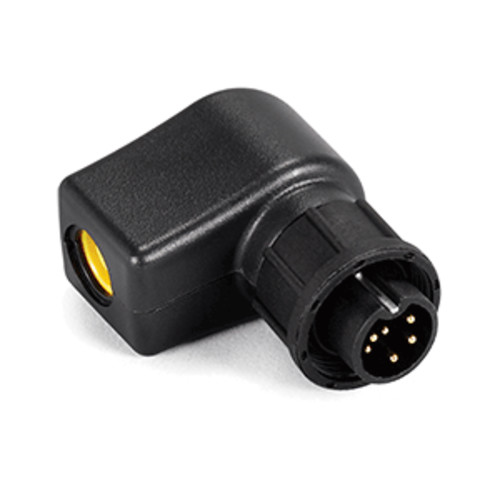
Description
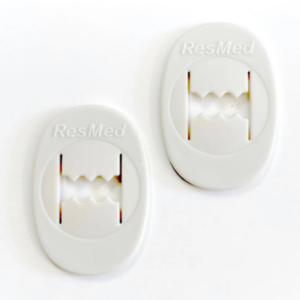
Quick answer: This is the genuine ResMed PSU adapter for the Air10 series (part 37342) — and it’s a specific accessory, not the device’s power brick. Its job is to connect the Air10 external power supply (or the Air10 DC converter) to the ResMed Power Station II (RPS II) battery so the battery can be charged. It’s used only for charging the RPS II — not to run your therapy device. Compatible with AirSense 10 / AirCurve 10 power supplies. Battery, power supply, and device not included.
What’s included
- 1 × ResMed Air10 PSU adapter for RPS II (part 37342)
The RPS II battery, the Air10 power supply, the DC converter, and the device are not included.
About this part
The ResMed Power Station II (RPS II) is ResMed’s external battery for running an Air10 device away from mains power. To recharge that battery, you connect it to the Air10’s power supply — and this adapter (37342) is the required link between them. It lets the Air10 power supply (the same 90W supply that runs the device) or the Air10 DC converter connect to the RPS II for charging.
An important usage detail: this adapter is only for charging the RPS II. When you’re actually using the battery to power your CPAP or BiLevel, the adapter is removed and stored, and the RPS II connects to the device through the separate RPS II DC cable instead. So a full RPS II setup typically involves three things: the battery, this PSU adapter (for charging), and the DC cable (for running the device).
Key features
- Genuine ResMed PSU adapter (37342) — for charging the RPS II battery.
- Links the Air10 power supply to the RPS II — enables battery charging.
- Works with the Air10 supply or DC converter — AirSense 10 / AirCurve 10 power.
- Charging only — removed and stored while running the device on battery.
- Part of a complete RPS II setup — alongside the battery and DC cable.
Specifications
| Specification | Detail |
|---|---|
| Product type | PSU adapter (battery-charging accessory) |
| Function | Connects the Air10 power supply / DC converter to the RPS II for charging |
| Compatible battery | ResMed Power Station II (RPS II) |
| Compatible power source | Air10 external power supply (e.g. 90W) or Air10 DC converter |
| Device families | AirSense 10 / AirCurve 10 (Air10) |
| Used for | Charging the RPS II only (not to run the device) |
| Related parts | RPS II DC cable (runs the device on battery) · Air10 90W PSU (37474) |
| Included | PSU adapter only |
| ResMed reference / SKU | 37342 |
| Brand | ResMed |
Important: this is not the device’s power supply
To avoid a common mix-up:
- 37474 — the Air10 90W power supply that runs your device from a wall outlet.
- 37342 (this item) — the adapter that lets that power supply charge the RPS II battery.
If you need to power your machine from the wall, you want the power supply (37474), not this adapter. If you have an RPS II battery and need to charge it from your Air10 supply, this adapter (37342) is the piece you need. Contact us at (646) 933-0080 if you’re unsure which you need.
Frequently asked questions
What does this adapter do?
It connects the Air10 power supply (or DC converter) to the ResMed Power Station II battery so the battery can be charged.
Is this my device’s power supply?
No — the device’s wall power supply is the 90W PSU (37474). This adapter is specifically for charging the RPS II battery.
Do I use it while running my CPAP on the battery?
No — it’s for charging only. When running the device on the RPS II, you remove this adapter and use the RPS II DC cable instead.
Which battery does it work with?
The ResMed Power Station II (RPS II).
Which device families?
The AirSense 10 and AirCurve 10 (Air10) power systems.
Do I need a prescription?
No — power accessories do not require a prescription.
Can I get it delivered in Brooklyn or shipped nationwide?
Yes — Stark Medical Supplies offers local pickup and delivery in Brooklyn and across NYC, plus USPS shipping throughout the continental U.S.
Use with compatible ResMed Air10 power equipment and the RPS II according to the RPS II and device user guides. Use the adapter for charging the battery as directed; remove and store it when running the device on battery power.
Reviews
There are no reviews yet.